How to Compress PDF to 200KB for UPSC, SSC & Govt Job Applications
Step-by-step guide to reducing PDF file size below 200KB or 500KB without losing quality. Perfect for online application forms.
If you have ever tried applying for a government job like UPSC, SSC, Banking (IBPS), or even college admissions, you know the frustration. You spend hours filling out the form, only to be stopped by a tiny red error message:"File size must be less than 200KB."
Your scanned PDF is likely 2MB or more. How do you shrink it to 10% of its size without making the text unreadable? Most online tools either make the PDF blurry or require you to upload your sensitive personal documents to a random server.
In this guide, I'll show you exactly how to use pdfriend.in to securely compress your documents to the exact size you need—whether it's 200KB, 500KB, or even 50KB—right in your browser.
Why is the 200KB Limit so Common?
Government portals receive millions of applications. To save server storage and bandwidth, they enforce strict size limits. Typically, the requirements are:
- Photos/Signatures: 20KB to 50KB
- Identity Proof (Passport/Driving License): 100KB to 300KB
- Mark sheets/Certificates: 200KB to 500KB
Step 1: Upload Your Documents
Head over to the Compress PDF Tool. Unlike other websites, you can drag and drop multiple files at once. You can even mix and match—upload a PDF certificate and a JPG image of your signature. Our tool handles them both together.
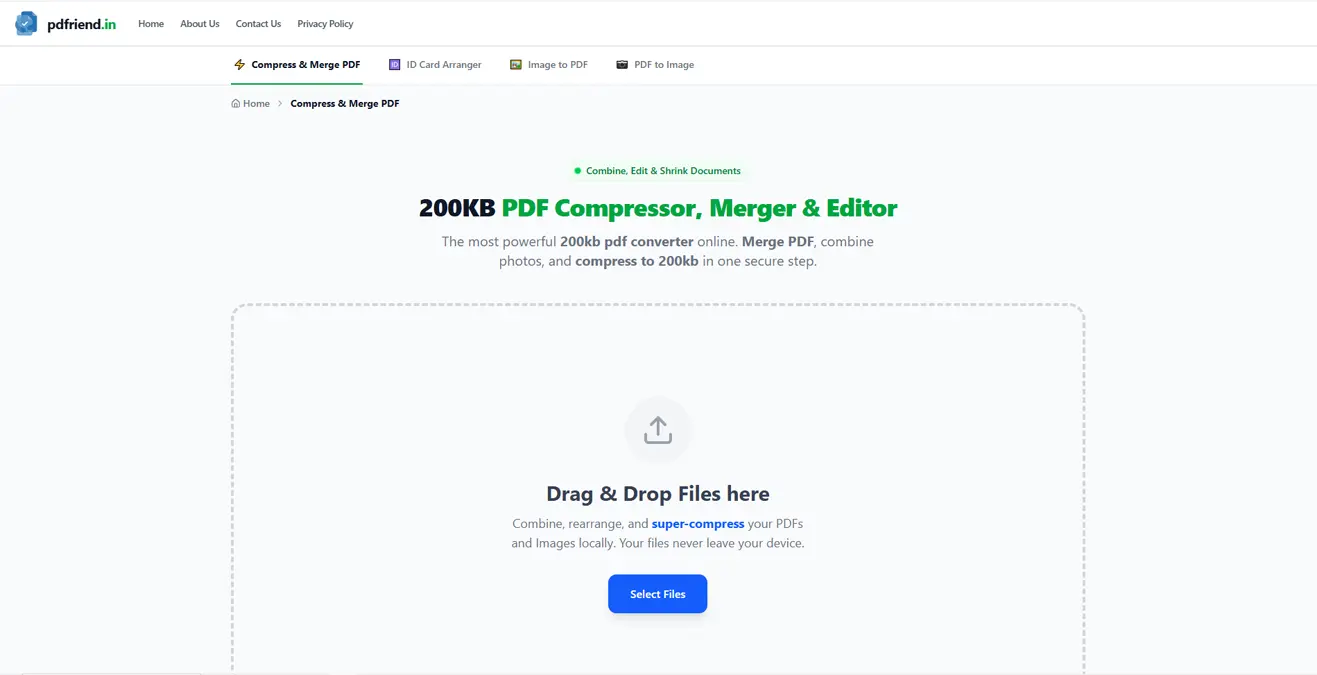
Simply drag your PDF or JPG files into the dashed upload area to begin.
Step 2: Choose Your Mode
Once your files are loaded, you will see two powerful options in the dashboard. This is where the magic happens.
Option A: Target Size Mode (Recommended)
This is the easiest way. If the form says "Max 200KB", simply:
- Click on the "Target Size" tab.
- Move the slider or type 200 in the box.
- Our engine automatically calculates the compression ratio needed to get as close to 200KB as possible without exceeding it.
Option B: Manual / Extreme Mode
If you want full control, switch to "Manual". Here you can adjust:
- Quality (JPEG): Lower this to reduce file size drastically. Around 60-70% is usually the sweet spot.
- DPI (Scale): If your scanned document is huge (e.g., 4000x3000 pixels), reduce the DPI. 0.8x or 1.0x is usually enough for screen viewing.
Step 3: Edit Before Compressing (Pro Tip)
Sometimes, the file size is large because of unnecessary borders. Click on "Pro Mode" to open the editor.
- Crop: Remove the table or bedsheet background from your photo.
- Filter: Apply the "Black & White" filter. This removes color data, which can reduce file size by 50% instantly!
Step 4: Generate and Download
Click the "Generate PDF" button. Because we use your device's processor (WebAssembly), it's incredibly fast.
You'll see a preview of the final file size. If it says "198 KB", you are safe to upload. Click Download and you're done.
Frequently Asked Questions
Is it safe for Sensitive ID Cards?
Yes. This is the most important feature of pdfriend.in. We do not have a backend server for processing.When you compress a file, the code runs inside your Chrome/Edge/Firefox browser. Your sensitive document data literally never leaves your laptop or phone.
What if the quality is too low?
If the text becomes unreadable at 200KB, try these tips: 1. Crop the image to remove white space. 2. Use the "Grayscale" filter instead of color. 3. Scan the original document at a lower DPI (like 150 DPI) initially.
Ready to fix your documents? Start Compressing Now.
UPSC PDF Compressor
Shrink your documents to exactly 200KB, 500KB or any custom size. Secure, offline, and optimized for Indian government portals.
Compress PDF NowMore from the web
About the author

PDfriend Team
Developers & Security Advocates
Focus
Development & Cybersecurity
Experience
Combined Experience
The Mission Behind pdfriend.in
"With years of combined experience in development, cybersecurity, and the evolving internet landscape, our team is driven by a shared technical mission. The recent surge in document forgery and identity fraud is what led us to build pdfriend.in together. We have engineered this platform to be entirely 'Zero-Server' because we believe in absolute data privacy. While our team ensures these tools are secure, we always remind our users that true safety also requires protecting your own devices from untrusted software and local malware."
Commitment to Safety: Every tool on this platform is strictly audited by our developers and built to operate 100% offline. No cloud, no risk, no compromises.