
Compress & Merge PDF to 200KB Online Free
Shrink PDFs or merge multiple documents into a single 200KB file without losing quality. Keep text sharp, signatures clear, and meet UPSC, SSC, and official portal limits.
Drop your PDF here or click Select Files
Supports PDF, JPG, PNG & WEBP files up to 100MB
No Quality Loss
100% Private & Free
Merge & Compress
Compress & Merge PDF to 200KB Online Free
Compress and merge PDF to 200KB online for free. Combine multiple PDFs or images into a 200KB file. 100% private in-browser tool for UPSC, SSC & govt forms.
Why use this tool?
Our engine uses smart 'Target Size Logic' to shrink PDF documents to exactly 200KB. It analyzes images, fonts, and structural data to find the perfect balance between size and clarity without requiring a server upload.
Unlike traditional cloud-based tools, PDFriend processes everything locally. You get a faster, more secure experience with zero risk of your data being stored on a cloud server.
When to use 200KB limit?
- • Compress PDF to below 200kb for government and job portals.
- • Merge multiple PDF files and compress to 200kb in one go.
- • Compress image to 200kb and convert to PDF instantly.
- • Reduce PDF size to 200kb for email and WhatsApp sharing.
- • Extreme compression for large documents over 2MB to 200kb.
- • Secure redaction and metadata removal before sharing IDs.
- • Add passwords or watermarks to your 200kb compressed files.
Quick Start Guide
Drop your files
Upload PDFs, JPGs, or PNGs. Everything is processed in your browser memory—nothing is uploaded to any server.
Apply Enhancements
Use the sidebar to add a watermark, toggle page numbers, or scrub metadata. Only pick what you need.
Edit & Clean
Click a page to rotate it, redact sensitive info, or crop out messy margins. Drag to reorder or click delete to remove pages.
Lock & Shrink
Set a password if needed and pick your target size (e.g., 100KB or 2MB). Our engine handles the rest.
Save Locally
Hit Generate and Download. Your new, optimized file is ready instantly.
Ways to Make a PDF 200KB
Resize PDF to 200KB Online
When applying for competitive examinations or submitting resumes, you often need to resize PDF to 200kb without distorting page dimensions. PDFriend maintains standard A4 proportions while reducing file payload directly in your browser.
Get PDF Less Than 200KB
Need a PDF less than 200kb for portals that strictly enforce a 199KB limit? Use our Target Size feature to set your limit to 190KB or 180KB, ensuring zero upload rejections.
Shrink PDF Below 200KB
To shrink a PDF below 200kb containing high-resolution scanned certificates, enable our 1-click Grayscale filter. It strips heavy color channels while keeping text, QR codes, and official stamps ultra-sharp.
Keep PDF Under 200KB for Govt Forms
Keep your multi-page documents strictly under 200kb for UPSC, SSC, and state PSC submissions. You can also combine separate marksheet photos into a single PDF under 200KB in one click.
How to Compress PDF to 200kb Online Without Losing Quality
The most common challenge when you need to compress PDF to 200kb online free is maintaining legibility. Standard tools often blur text to reduce size, making your document useless for official verifications. Our 200kb PDF converter uses advanced image optimization and metadata stripping to ensure that even at a small file size, your text remains crystal clear.
To achieve high compress pdf to 200kb, we use a multi-pass compression algorithm. This is particularly effective for extreme compress pdf to 200kb tasks where the original file might be several megabytes. Whether you're using a mac, windows, or mobile, the processing happens in your browser, ensuring high-speed results and total privacy.
Best Online PDF Compressor for UPSC, SSC & Govt Portals
Portals like UPSC and SSC often require you to reduce PDF size to 200kb or even 100kb. Using a generic pdf compressor can lead to rejections if the file dimensions or quality are altered. PDFriend ensures your document's aspect ratio and 300 DPI clarity are preserved, making it the perfect bulk pdf compressor for candidates applying for multiple exams.
If you have separate photos of your certificates, you can compress image to 200kb and convert to pdf in one seamless workflow. This eliminates the need to jump between a converter and a compressor, saving you time during busy application windows.
Secure & Private: Why Client-Side Processing Protects Your Data
When you compress pdf below 200kb online free on most sites, your document is uploaded to a remote server. This is a significant risk for documents containing sensitive data like your private documents or bank details. PDFriend is built on WebAssembly (WASM), meaning the pdf size reducer runs entirely on your local hardware.
Whether you need to compress pdf from 1mb to 200kb or compress pdf 2mb to 200kb, your files never leave your computer. We don't store your files, we don't track your data, and we provide a level of privacy that traditional server-based tools cannot guarantee in a web environment.
How to Merge PDF to 200kb Online in Seconds
The most frequent request we get from students and professionals is how to merge pdf to 200kb. When you are applying for jobs or submitting documents to government portals, you are often asked to upload multiple documents (like your marksheets and certificates) as a single file, but with a strict file size limit. Our tool is specifically engineered to combine and compress pdf to 200kb in one seamless, offline process.
Unlike other tools where you have to merge your files on one site and then compress them on another, PDFriend's hybrid PDF merger allows you to select multiple files, reorder them via drag-and-drop, and instantly output a single merged file with a final target size of exactly 200kb.
This all-in-one merge and compress tool also includes metadata scrubbing. By checking the 'Scrub Meta' box, you can reduce pdf size to below 200kb while also removing hidden tracking data like your computer name, creator software, and exact timestamps, providing a truly anonymous and secure merged PDF for your digital submissions.
Quick Tips for the Best Compression Results:
- Actual Size: Always print at 100% scale to maintain the standard document dimensions.
- DPI Matters: Our tool maintains high DPI for QR codes and signatures to scan correctly.
- File Formats: We support PDF, JPG, PNG, and WEBP—everything is converted and compressed to your 200kb limit.
- Batch Processing: Use the Pro Editor to compress multiple pdf to 200kb by merging them first.
Professional Privacy
We built this because we hate "free" tools that steal your data. When you unlock a PDF or redact sensitive info on pdfriend.in, it happens on your hardware.
Zero uploads. Zero tracking. Total control over your documents.
Related Guide
How to compress to 200KB for UPSC/SSCPossible Issues
Large files (over 50MB) may take a few extra seconds for local initialization.
Password-protected files must be unlocked using our built-in tool before compression.
Frequently Asked Questions
Can I resize a PDF to exactly 200KB?
How to compress PDF to 200kb without losing quality?
How do I compress a PDF to 200kb or less?
Can I merge and compress at the same time?
How is PDFriend different from standard online compressors?
Can I compress images to 200kb and convert to PDF?
What is the best PDF compressor online for govt forms?
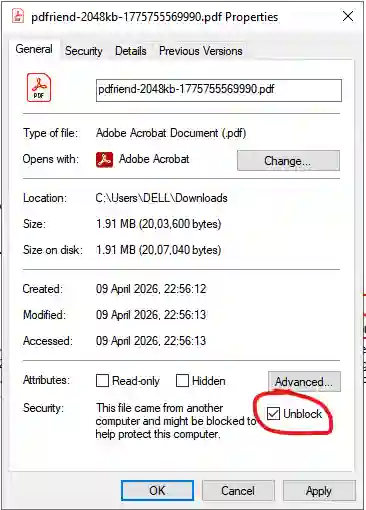
Why does Windows Preview say the file 'could harm your computer'?
This is a Windows security feature for files downloaded from the internet. Since you generated this PDF safely in your browser, you can trust it. To fix the preview, follow these steps:
- Right-click the downloaded PDF and select Properties.
- In the General tab, check the Unblock box at the bottom.
- Click Apply and then OK.
Need even smaller? Try our 100KB PDF Compressor or the ID Card Arranger for physical prints.
More PDF Tools
Merge PDF
Combine multiple PDF files into one document. Drag-and-drop reordering with page range selection. Lossless merge with output integrity verification.
Split PDF
Extract specific pages or split PDFs into chunks. Split by range, every N pages, or into equal parts. Verified ZIP download.
Extract PDF Pages
Select specific pages, reorder and rotate them, then export as combined PDF, separate PDFs, or high-quality images. Lossless with integrity verification.
Insert PDF Pages
Insert pages from other PDFs, custom blank templates, or images into any PDF with live sequence preview and output integrity verification.
Remove PDF Pages
Delete unwanted pages with live previews, range numbers, and shift-click selection. Lossless export with output integrity verification.
Rotate PDF
Rotate individual pages or entire PDF by 90°, 180°, or 270°. True PDF rotation — lossless, vector-preserving, non-rasterized.
Crop & Resize PDF
Crop margins and resize pages to A3, A4, A5, Letter, Legal, or custom dimensions. Vector-preserving resize with dimension verification.
Word to PDF
Convert Word documents (.docx) to high-quality PDF files instantly in your browser without cloud uploads.
Premium Image to PDF
Convert high-res photos to official PDF documents. Apply professional filters and exact page sizing without any watermarks.
PDF to Image
Extract sharp JPG/PNG images from PDF pages. High-resolution output up to 300 DPI for perfect quality.